Guides / Quality
Drawing Revision Control With a Supplier: Keep Quote, Order and Part on One Revision
November 6, 2026
Drawing revision control means one rule: the quote, the purchase order, the drawing, the model and the inspection report all carry the same revision letter, and the shop works only to the revision named on the order. Four habits make that real. Name the revision on every document. Issue every change as a numbered change notice with a reason. Get the shop to read back the new revision before work restarts. Agree in advance what happens to work already done. Most wrong-revision losses come from skipping one of these, not from a drafting error.
How a part ends up on the wrong revision
A part has more than one source of truth. A buyer sends a PDF and a STEP file. The shop quotes from one, programs from the other and checks the result against a third copy that was emailed a week earlier. When anything changes, each copy changes at a different time.
The usual routes, each of which is ordinary:
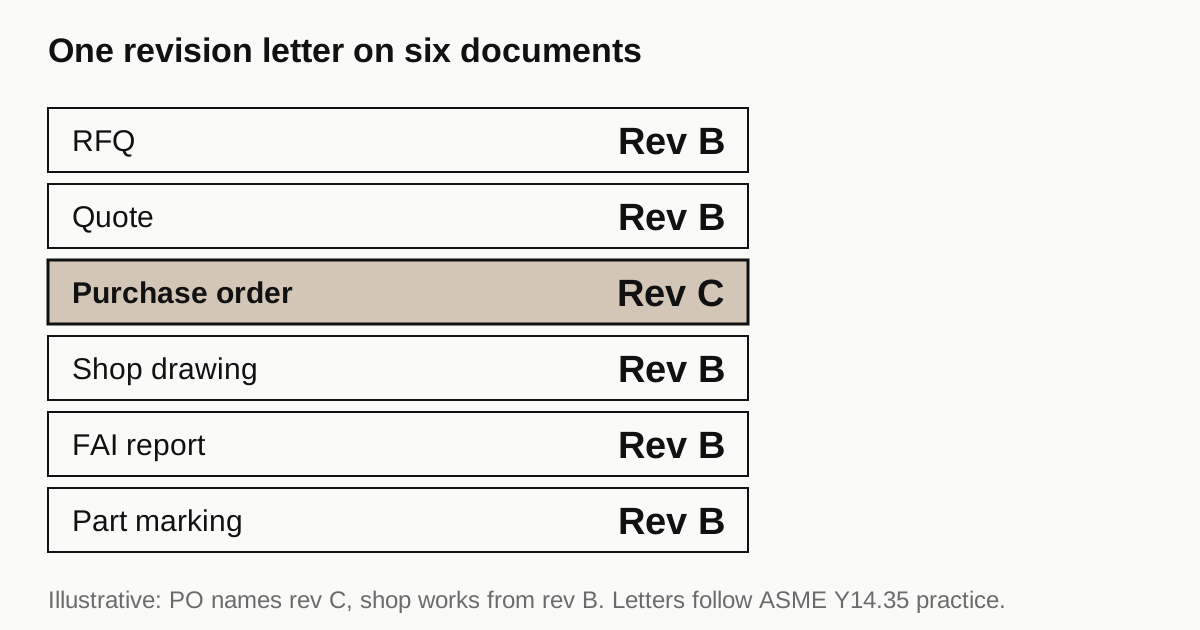
- Quote on one revision, order on another. The RFQ went out on rev B. A change was agreed by email, the order says rev C and the shop’s quote still describes rev B. Price and lead time were never reset.
- Two files in the folder. A superseded drawing stays in a shared folder next to the new one, and the machinist opens the wrong one. Drawing mistakes that stop a quote lists this as the twelfth mistake.
- A model that disagrees with the drawing. The STEP file was exported before the last change and the PDF after, or the other way round.
- Change by email, no document. “Make the hole 0.1 larger” is a change with no revision, no reason and no record. Three weeks later nobody can say which parts carry it.
- Repeat order on an old file. A shop reorders from its own saved copy and not from your latest release. It is also why a repeat part changes its price when someone finally notices.
- A revision after material is cut. The change is sent after the plate was sawn and programmed. The shop then has stock and setup it cannot reuse.
What the standard and the title block say
ASME Y14.35 is the standard on revising drawings and associated documents. ASME describes its scope as defining the practices for revising drawings and associated documents and establishing methods for identifying and recording revisions, applying to any form of original drawing and associated documents. The full text is behind a paywall, and we did not read it. A study guide that summarises the older Y14.35M describes the revision block as a permanent ledger of changes at the top right of the sheet or beside the title block, recording the revision letter, a description of the change, the change order number and approvals. We treat that as directional.
Other points worth knowing, from the same secondary summary: revision letters advance alphabetically, an initial release may carry a dash, and the letters I, O, Q, S, X and Z are omitted because they can be mistaken for numerals or axis names. After the single letters run out, two-letter combinations are used. If your own scheme differs, tell the shop what it is, because a letter they do not recognise as later or earlier than another is a risk.
Wikipedia’s summary of title block practice adds two more. The drawing number is unique for each technical document of the organisation, and ISO 7200 sets eight mandatory title block fields, including the drawing number and the issue date, with the revision tracked in the revisions block. The drawing is also described as a legal document that forms part of the contract with the purchase order and any change orders. That is why the order, not the email thread, has to carry the revision.
Which file governs
Say it on the order. If the PDF and the STEP model ever disagree, one of them wins, and the shop should know which before programming. One choice is the drawing as controlling and the model as reference for geometry. The other is the model as controlling under model-based definition, where the drawing may be marked as reference only. Either works. Leaving it open does not. The RFQ package checklist shows what to include in the first release.
Issue a change as a change notice
A casual email is not a change. A change notice, called an engineering change order or notice, is a document that describes and authorises a change. Wikipedia lists what one contains: the affected part and drawings, the reason, a before and after description, the affected documents and departments, approvals and when to introduce the change. For a supplier, add four lines:
- Work in progress. The count of finished parts, parts in work and raw material, and what happens to each.
- Price and lead time. Whether either changes, confirmed in writing before work resumes.
- First article. Whether the first article must be redone. The first article report guide lists a drawing revision as one trigger.
- Effectivity. From which lot or date the new revision applies.
For parts already made, three outcomes exist. The table below gives our suggested starting position on cost for each. Confirm it per order and do not assume it.
| Disposition | Meaning | Who pays, our suggested starting position |
|---|---|---|
| Use as is | Old revision accepted for this lot | Nobody, if the change is minor |
| Rework | Parts altered to the new revision | The party who requested the change |
| Scrap | Parts discarded and remade | The party whose document was wrong |
Need a quote for this part? Get a quote
The read-back that stops errors
The cheapest step is a short written reply. When you send a revision, ask the shop to reply with three things: the new revision letter, the list of changes it understood and the confirmation that no work continues on the old revision. A shop that replies “OK” has told you nothing. A shop that replies “rev C received, hole diameter changed to 8.02 from 8.00, pocket depth unchanged, stopped work on rev B” has shown it read the document.
Add a stop-work line to your change notice: no machining on the old revision after receipt. It is cheaper than a lot of scrap.
Housekeeping that prevents most of it
| Document | Where the revision should appear | Check |
|---|---|---|
| RFQ | In the message and the file name | Same letter as the drawing |
| Quote | On the quote header | The shop quoted what you sent |
| Purchase order | On every line | Matches the quote |
| Drawing PDF | In the title block and the file name | Both agree |
| STEP model | In the file name and the model properties | Exported after the last change |
| First article report | In the report header | Measured to the order revision |
| Certificate and packing list | In the part description | Matches the part label |
Use one folder per part number and move superseded files to an archive folder the day a new revision issues. Do not use names such as “final” or “final2”. A file named by part number and revision, for example 10450-RevC.pdf, is self-describing.
Time zones and shop closures
A change sent at the end of your day reaches the shop at the start of theirs, which suits a read-back the same day. A change sent just before a shop closure may sit unread. The Tet lead time guide covers the closure, and a revision sent into it restarts work after it. Batch changes, and avoid sending one the week before a long shop closure unless you also confirm someone will read it.
Where this fits on this site
When you send an RFQ, put the revision letter on the drawing, the file name and the form. Shops quote that revision. If you revise after the quote, say so, because the price and lead time may change. We work from the package as you sent it and do not edit your drawings. We come back within 24 business hours with a quote or a plain no, and how an order runs explains the screening.
Sources
- ASME, Y14.35 Revision of Engineering Product Definition Datasets and Associated Documents (scope; the standard itself is paywalled)
- Wikipedia, Engineering drawing (revisions block, unique drawing number, ISO 7200 title block fields, legal document)
- Wikipedia, Engineering change order (contents of a change order)
- Open Exam Prep, ASQ CQI study guide, engineering drawing structure and conventions (revision block contents and letters, secondary summary of ASME Y14.35M)
Frequently asked questions
What is a revision block on an engineering drawing?
It is a tabulated list of the revisions of the drawing, usually at the top right or beside the title block. A study guide summarising ASME Y14.35M says it records the revision letter, a description of the change, the change order number, and approvals with dates. Any change after release should appear in it.
Which letters are skipped in drawing revision letters?
A study guide summarising ASME Y14.35M says I, O, Q, S, X and Z are omitted to avoid confusion with numerals and axis references, and that an initial release may show a dash. This is a secondary summary, so check the current ASME Y14.35 text before you write a company rule.
Does the drawing or the 3D model govern?
Whichever the purchase order says. Wikipedia notes an engineering drawing is a legal document that forms part of a contract together with the purchase order and change orders, and that model-based definition may mark the drawing as reference only. State the precedence on the order, so a STEP file and a PDF that disagree have a defined winner.
What if a shop already made parts to the old revision?
Decide the disposition in the change notice: use as is, rework, or scrap, and who pays for each. If you leave it open the shop will assume the work is yours to pay for. Ask for a count of finished parts and work in progress when you issue the change.
Need a quote for this part?
Send the drawing. We quote the finished parts, place the work with a partner shop in Vietnam and reply within 24 business hours.
Get a quoteMore on quality
- Handling an OSAT Customer Complaint on Jigs: From Return to Closed Report
- How to Test ESD Fixture Materials on Receipt: Surface Resistance, Ground Path and the Record Sheet
- What a First Sample Must Prove to a New Semiconductor Customer
- Why Jigs and Fixtures Fail on the Line: Warpage, Wear, Loosening and Contamination
All guides and the sourcing glossary.